Event Handling
So far we’ve only used commands to interact with our bot, but our bot can do a lot more than just respond to commands!
What are Events?
Events are actions that happen in Discord, such as a user sending a message, a user joining a guild, a reaction being added to a message, etc.
Actually, we’ve used 2 of them already!
- When a user uses a Slash Command, it triggers an
ApplicationCommandInteractionCreateevent, which our bot listens for and responds to. - When we start our bot, it also triggers a
Readyevent, which we can use to perform actions when the bot is fully connected and ready.
Your bot can listen for these events and respond to them accordingly.
Setting up Event Handlers
To handle events in DisGo, we can use the events package from DisGo, then register it to our bot using bot.WithEventListeners / bot.WithEventListenerFunc when creating the bot client.
Here’s an example of replying to a user if they mention our bot (Note that you’ll need Message Content intent enabled in your bot settings for this to work)
func onMessageCreate(e *events.MessageCreate) {
  if e.Message.Author.Bot {
    return
  }

  if strings.Contains(e.Message.Content, e.Client().ApplicationID().String()) {
    e.Client().Rest().CreateMessage(e.ChannelID, discord.MessageCreate{
      Content: "You called? 📞",
    })
  }
}

//... when creating the client
    bot.WithEventListenerFunc(onMessageCreate),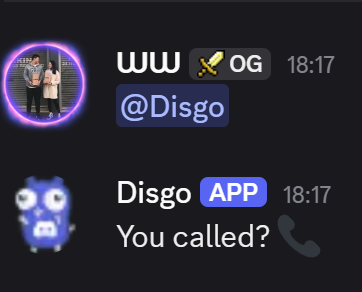
You can see a list of all available events in the DisGo Events Package.
Further Reading
That’s mostly it for our basic bot setup! From here you can explore more advanced topics such as: